Announcement
Business Center User Management platform launched!
Posted on 12/14/2022 12:00:00 PM
The Partner Operations Team is happy to announce the launch of a new feature in the LS Retail Business Center: the User Management Platform.
The Business Center is where our Partners can view account and license information including enhancement dates, auto bill status, invoices and more. This information is not for everybody to access so our Partners have appointed Business Center Admins that we have asked to approve new Business Center users. These Admins now have access to the User Management Platform for the following purposes:
- Receive User Requests for Access to the Business Center, first by email and then visible in the User Management
- Approve and give access to requester to the Business Center, or reject
- Add and delete partner contacts
- Add and withdraw employees’ role responsibilities related to Agreement Administration and Operational Functions
- Add and withdraw JIRA access for employees;
- Assign another BC Admin
- Give and select access separately to the Account information, Customer information, and Orders and Invoices information.
- Give an overview of the certification status of each LS Retail consultant of the organization
Instructions for the BC Admin:
- Access to Business Center and Role responsibilities management
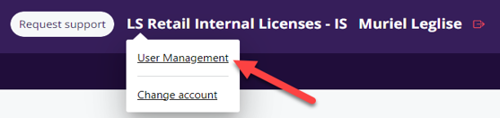
In the Business Center, go the name of the organization in the top right corner and select User Management
BC Admin receives an email requesting his approval for access to the Business Center for an employees of his organization. To approve or deny the request, the BC Admin goes in the User Management and clicks on Pending User Requests.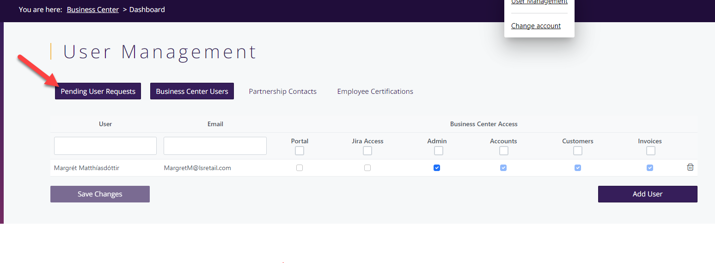
Click on the Green button to approve. Red button to reject.
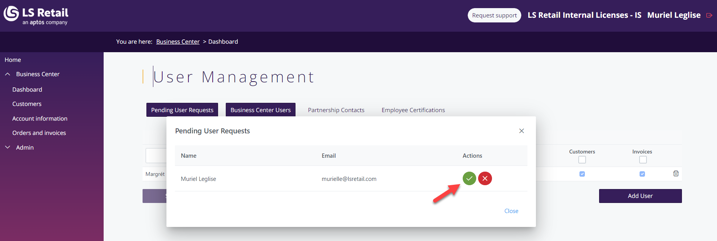
If approved, the dialog closes and the BC Admin ticks the role responsibilities in the User Management panel for Business Center Users and Partnership Contacts.
If the new contact is an existing user, the BC Admins check-marks the relevant role responsibilities in the User Management panel for Business Center Users and Partnership Contacts.

- To delete any existing user, use the bin on the right side.
- To add a new user - click on Add User and select the Role responsibilities

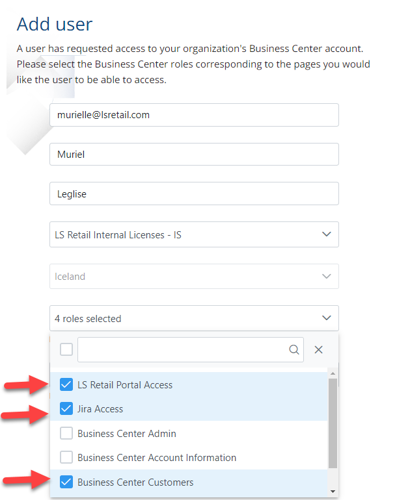
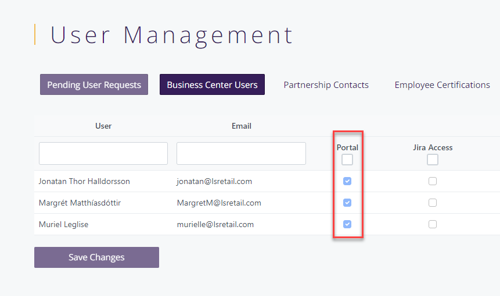
All users listed in the User Management must have Portal Access to allow the BC Admin to check-mark the assigned role responsibilities.
Certification and Training Data view
Certification and Training data is now visible to all partners
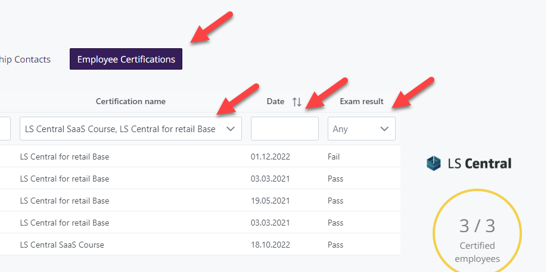
Would you like to know your team status on training and certification? The list of Employee Certifications shows all active certificates currently associated with your account.
- Overview over time
- Exam result
- Number of Certified employees
Do you need to know if your team is ready to sell LS Central SaaS? Check under Certification name and see the result.
Please contact LS Retail Partner Operations pops@lsretail.com if you need any assistance or information.