Announcement
Analytics for LS Central 2024.1 released
Posted on 4/9/2024 12:00:00 PM
In this version of Analytics the focus has been on the new Hospitality report and on adding Budget and Section and shelf report pages to the Sales Analytics report.
Reports have been added to Sales Analytics for Budgets and budget comparisons. The three new report pages show Net sales and budget amount comparison, Budget overview for a selected budget and budget overview for Item Hierarchy. 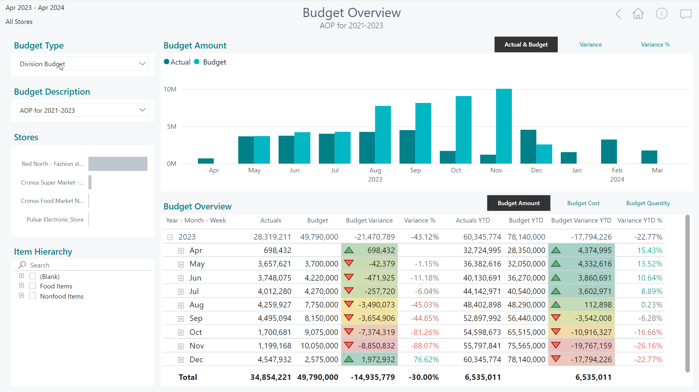
Section and shelf report and Individual member report have also been added to Sales Analytics.
The new Hospitality report shows KPIs and visuals for data created with LS Central Hospitality functionality. Such as Sale by hospitality type, menu engineering report, dining table and section utilization statistics, guest statistics, reservation analysis and Kitchen Order Ticket (KOT) statistics such as service times by orders, display stations and items. The report is structured like our other reports and begins with a navigation page where you can see the different report page sections.
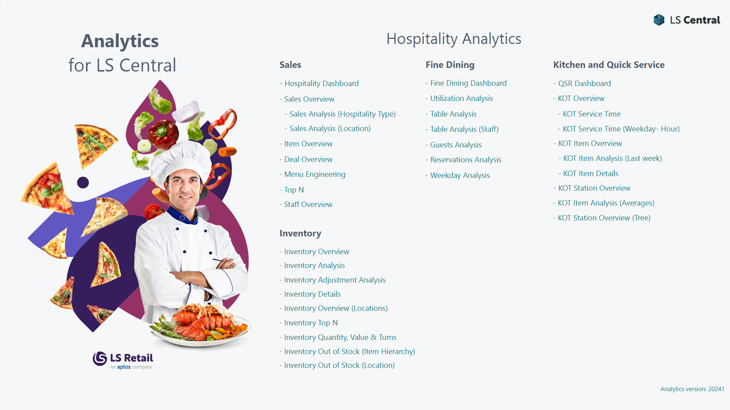
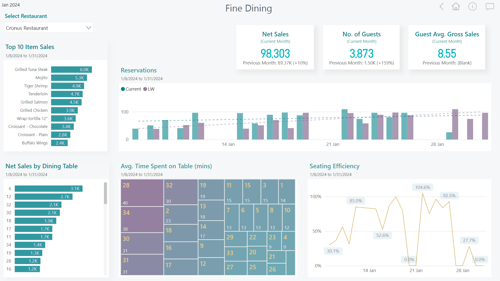
Here you can also see the fine dining dashboard with sample data.
As always, we have also done some bug fixing.
If you are interested in knowing more about Analytics and the updates in our latest version, please consult the release notes in the LS Central online help.
To get started with Analytics today you can review the onboarding documentation.